A clearer picture of production
PF ProducerDesk is a modular, browser-based workspace built around the decisions game producers, development managers, product owners and team leads make every day. It brings together delivery commitments, people capacity, production risks, meeting decisions and external market signals, with an AI assistant that can help interpret recorded evidence.
The aim is not to replace Jira, discipline leads or human judgment. It is to reduce the time spent assembling fragmented updates and make the next action, risk or decision easier to identify.
Current stage: An actively developed, private prototype with implemented modules and evolving workflows. The examples below describe product capabilities, not claims of validated commercial impact or enterprise-scale deployment.
The production problem
A major game release rarely fails because nobody has a task list. It becomes difficult when a content milestone depends on an overloaded animation team, a release gate is waiting on QA evidence, risks are recorded separately from delivery plans, and leadership must reconcile competing versions of progress.
ProducerDesk approaches this as a connected leadership problem: What are we delivering? Who has capacity? What could prevent it? What decisions are needed?
Modules and their value
D.M.C. — Delivery Management & Control
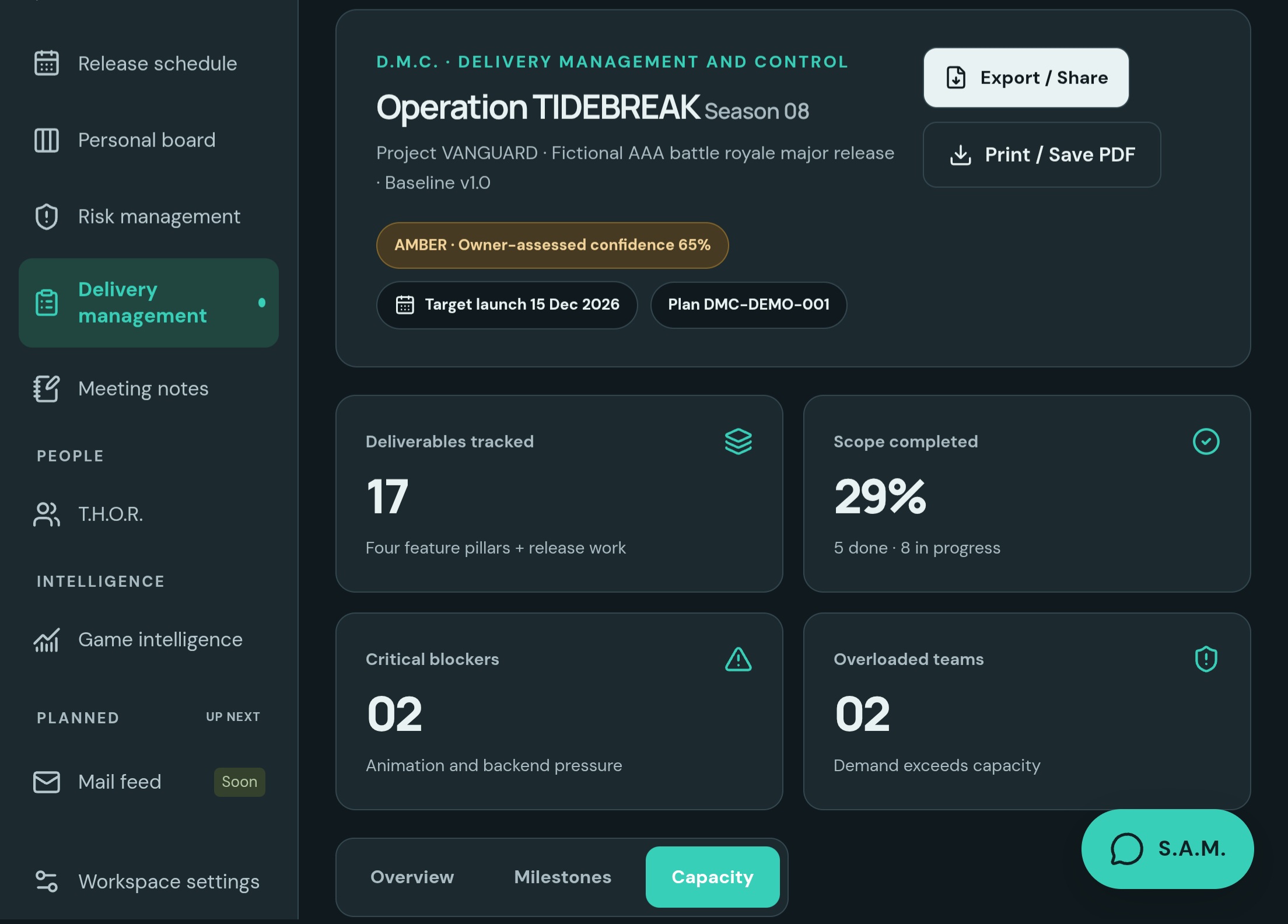
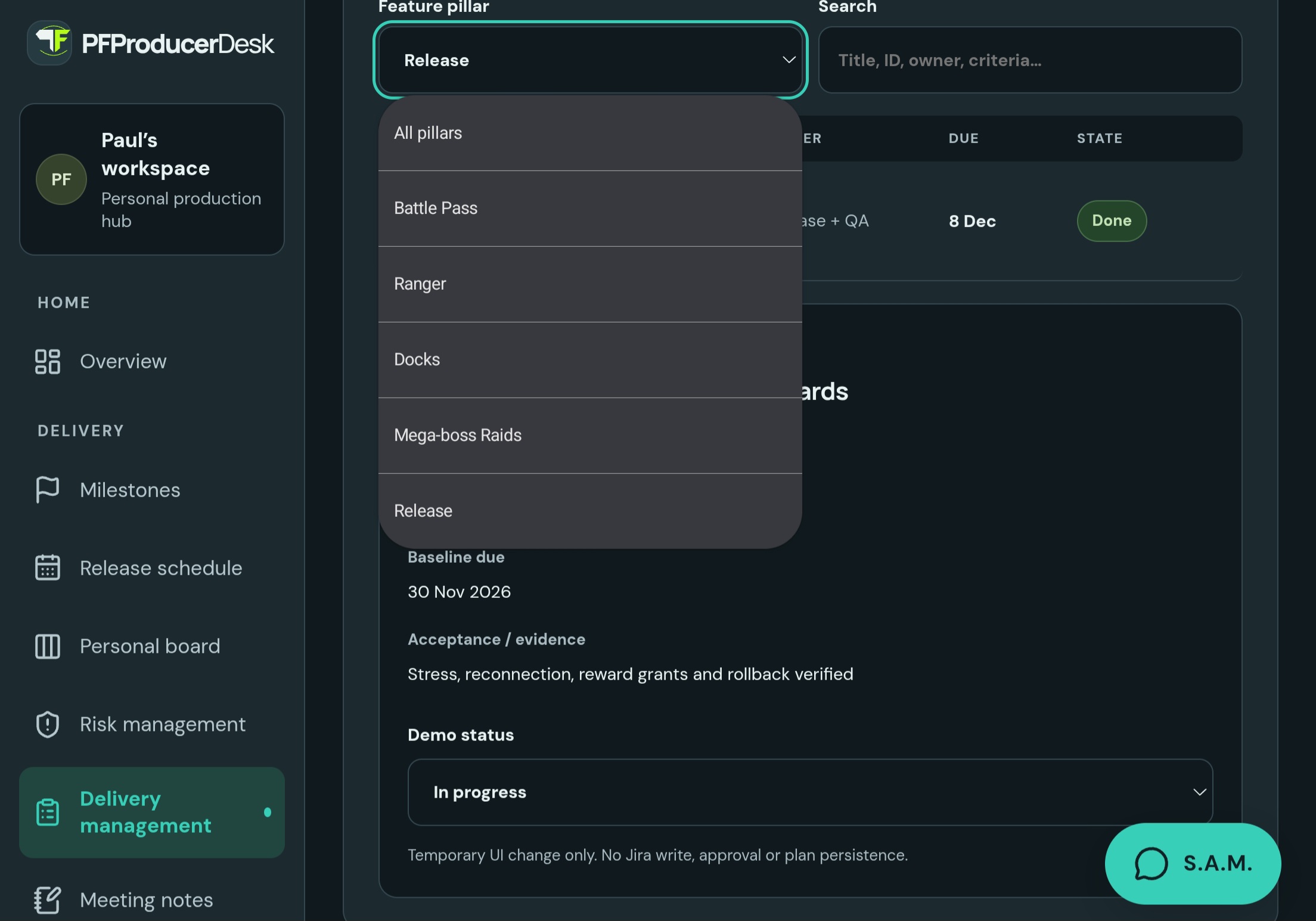
Plan and communicate an entire release, not just its individual tasks.
- What it covers: Deliverables and acceptance criteria, milestone gates, delivery status, team capacity and resource pressure, cross-team dependencies, risks and decisions.
- Leadership value: Makes scope and readiness visible in one place, so producers can challenge unrealistic plans before content lock, certification or launch.
- Practical scenario: A season update combines a battle pass, new character, map and raid event. D.M.C. exposes shared animation and backend bottlenecks alongside the release calendar.
- Reporting: Full delivery reports can be generated in TXT and Markdown, copied, and used to prepare an email draft for stakeholder communication. Email drafting does not send a message automatically.
The current D.M.C. workspace includes an illustrative multi-pillar game-release plan. Sample figures and records are not real production performance metrics.
P.R.I.C.E. — Production Risk Intelligent Control Entity
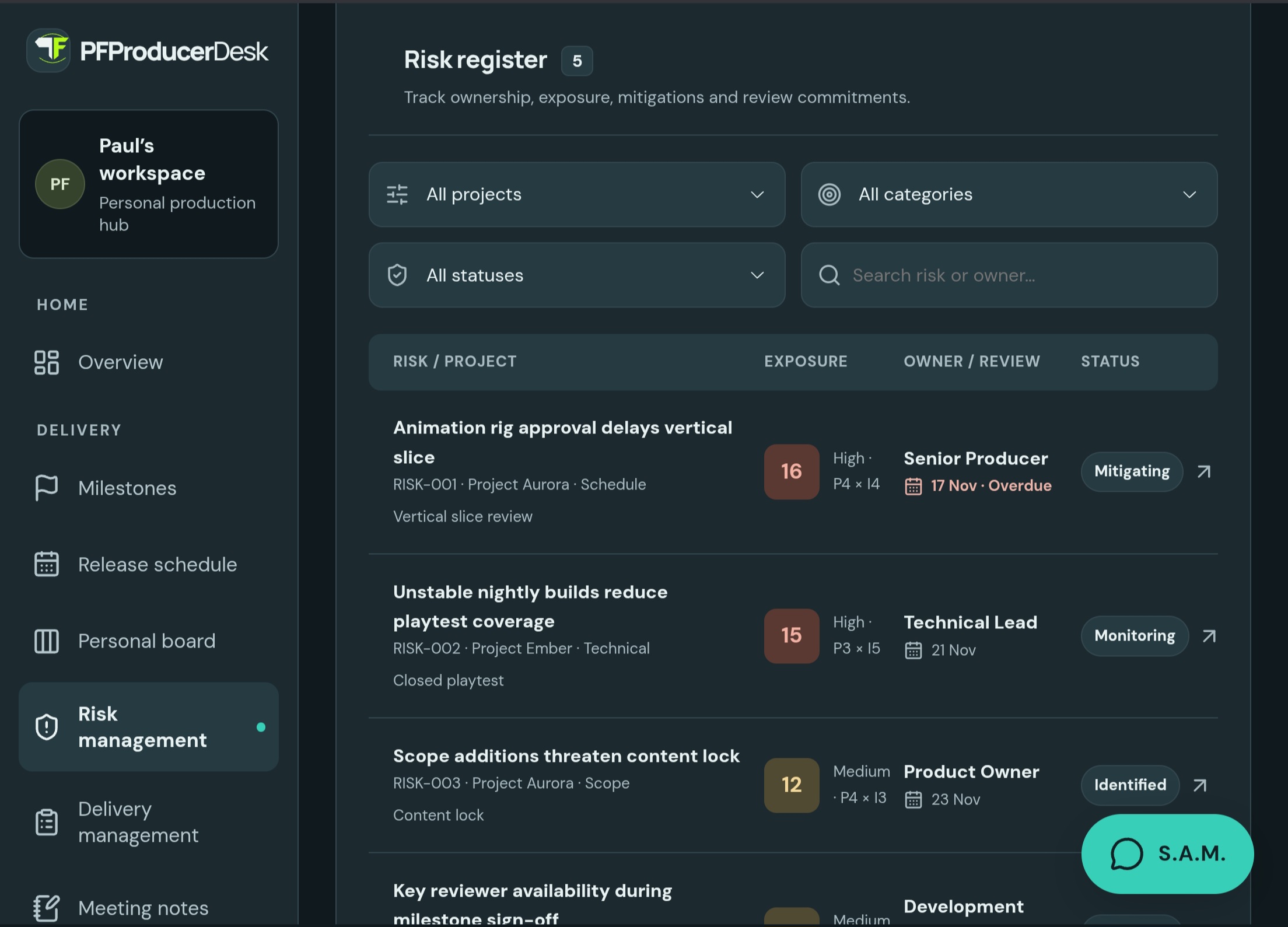
Turn risk registers into prioritization and follow-through.
- What it covers: Risk identification, probability and impact scoring, categories, owners, triggers, mitigation, contingency, review dates and status.
- Leadership value: Highlights high-exposure and overdue risks so escalation happens while mitigation is still possible.
- Practical scenario: A late animation approval threatens a vertical slice. P.R.I.C.E. records the trigger, accountable owner, mitigation plan and fallback, instead of leaving the concern buried in meeting notes.
T.H.O.R. — Team Health & Operational Resources
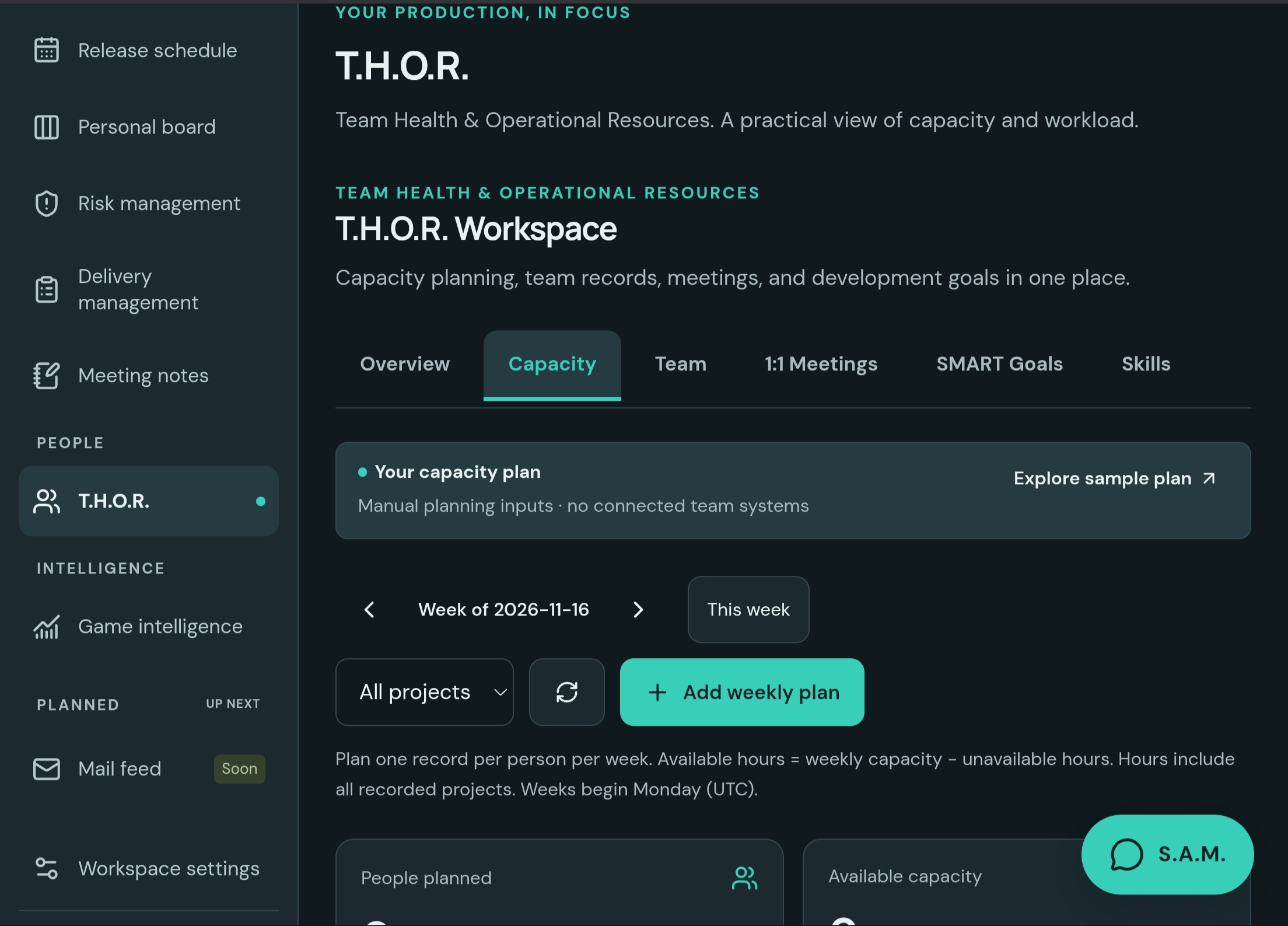
Connect delivery expectations with realistic team availability.
- What it covers: Team overview, weekly capacity and allocations, team records, 1:1 meetings, SMART development goals and a skills view.
- Leadership value: Helps leads see workload conflicts, support development conversations and identify where specialist availability could constrain a milestone.
- Practical scenario: Two projects require the same senior technical artist during the same sprint. T.H.O.R. helps make the allocation conflict explicit before it becomes a delivery surprise.
Capacity records are planning inputs, not a substitute for conversations with team members or an automated assessment of employee performance.
S.A.M. — AI Production Copilot
Ask better questions of recorded production information.
- What it covers: Conversational assistance, a Production Pulse and project-scoped briefings based on available workspace records.
- Leadership value: Helps producers identify blocked, overdue and at-risk items and prepare more focused discussions with stakeholders.
- Evidence discipline: Briefings distinguish recorded facts and decisions from hypotheses, recommendations and missing evidence. Project scoping helps avoid mixing information from unrelated projects.
- Practical scenario: Before a leadership review, S.A.M. can surface the highest-priority issues supported by the selected project’s records and identify information still needed to make a decision.
S.A.M. is intended as a human-supervised decision-support tool, not an autonomous project manager or an approval authority.
Production Overview & Weekly Priorities
Start the week with the commitments that matter.
- What it covers: Weekly priorities, completion progress, upcoming milestones and work requiring attention.
- Leadership value: Provides a compact operational snapshot for stand-ups, production reviews and personal planning.
- Practical scenario: A producer sees a blocked integration item and an approaching review milestone before deciding where to focus the day’s follow-ups.
Release Schedule & Milestones
Keep delivery dates connected to actual commitments.
- What it covers: Month and week calendar views, milestone records, dates and status.
- Leadership value: Makes release checkpoints and competing commitments easier to review across the schedule.
- Practical scenario: Content lock, release candidate, go/no-go and launch preparation can be considered as a sequence of delivery gates rather than isolated calendar entries.
Personal Kanban & Work Management
Keep individual follow-through visible.
- What it covers: A three-lane personal board, task priorities, due dates, status, blocked/at-risk visibility and filtering.
- Leadership value: Helps producers manage the coordination work that sits between larger Jira tickets, meetings and team handoffs.
- Practical scenario: Track an unresolved build decision, a publisher update and a QA follow-up without losing them in separate notes.
Meeting Notes, Decisions & Actions
Preserve why a decision was made—and who follows up.
- What it covers: Meeting records, participants, discussion notes, decisions and action items.
- Leadership value: Reduces ambiguity after reviews and helps turn discussion into accountable follow-up.
- Practical scenario: A feature-scope decision from a milestone review is recorded with its action, owner context and due date rather than relying on recollection.
Game Intelligence
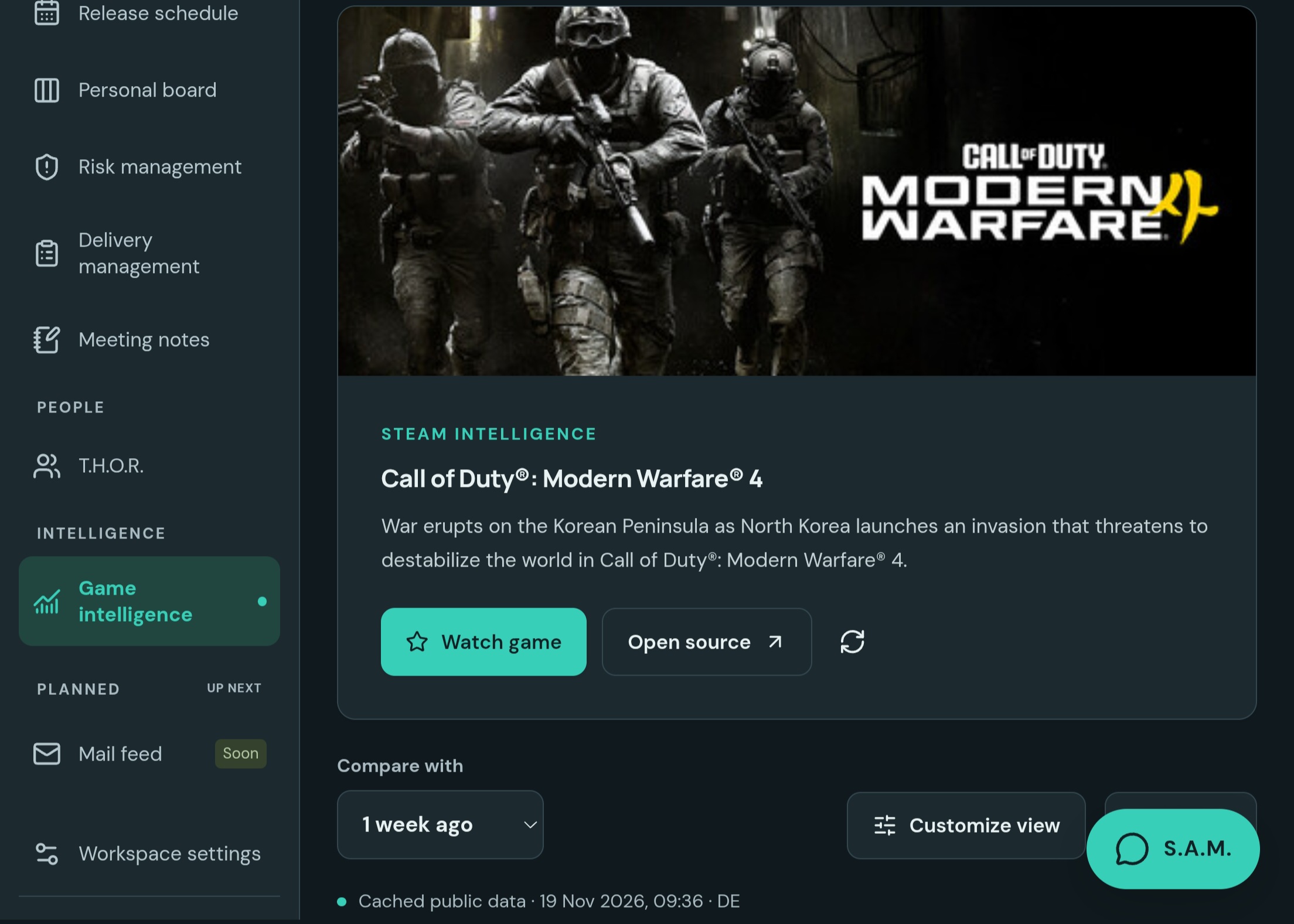
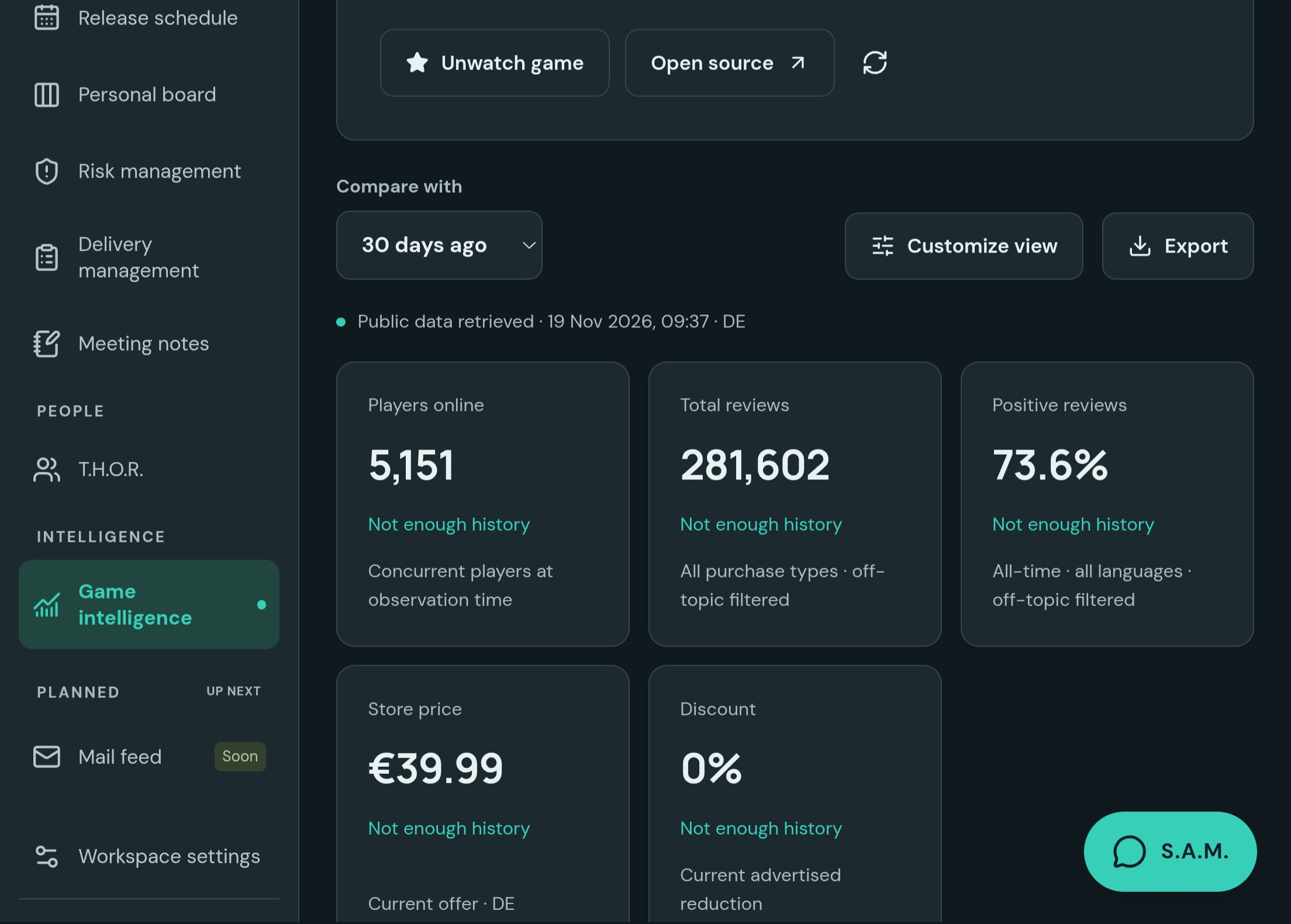
Bring external game-market signals into production conversations.
- What it covers: Game discovery, watchlists, available platform/region metrics, historical observations and configurable intelligence views.
- Leadership value: Gives producers and product leads a starting point for tracking competitors, releases and market signals without treating estimates as ground truth.
- Practical scenario: Compare public signals around a competing game’s update when discussing release timing, audience response or feature priorities.
Available data varies by platform and source. Public signals should be verified before being used for commercial forecasts.
How the modules work together
Consider a fictional major live-service update:
- D.M.C. organizes the battle pass, hero, map and event deliverables against milestones and release gates.
- T.H.O.R. helps expose capacity conflicts across shared specialists.
- P.R.I.C.E. captures the resulting schedule and technical risks with owners and mitigation plans.
- Meeting Notes and Kanban track decisions and the follow-up actions required.
- S.A.M. summarizes evidence-backed attention points for the next production review.
- Game Intelligence provides external context when the team evaluates market timing and competitive activity.
This is the intended value of the platform: one coherent production-management experience, with each module answering a different leadership question. These workflows are evolving; they should not be read as a claim that every module automatically synchronizes every record.
Designed for practical leadership
- Decision visibility: Make blockers, assumptions and required approvals explicit.
- Cross-functional alignment: Give production, design, engineering, art, QA and leadership a shared frame for discussion.
- Evidence over confident guesses: Keep recorded facts separate from AI suggestions and incomplete information.
- Modular adoption: Use the workspace for daily planning, team operations, release oversight or intelligence as needed.
- Browser-based access: A responsive web application rather than a desktop-only production tool.
Current scope and roadmap
The modules described above exist in the current codebase, but the platform remains an evolving prototype. Mail Feed is shown as planned. Direct Jira/Confluence workflow integrations are also identified in the application as future work; they should not be presented as connected production features today.
Some views use fictional sample records to demonstrate the workflow. Availability of particular data, persistence and AI features depends on the authenticated workspace and configured services.
My role
I conceived ProducerDesk as a product for real production-management problems and lead its product direction: feature definition, user journeys, requirements, prioritization, UX, implementation coordination, testing and iterative delivery. The platform draws on my experience in game production, Agile delivery and cross-functional team leadership.
Screenshot coverage
The screenshots above were captured from the ProducerDesk prototype and placed alongside the modules they illustrate. Additional screenshots for S.A.M., the Production Overview, Release Schedule, Kanban, Meeting Notes and other T.H.O.R. views can be added as they become available.
Portfolio note: ProducerDesk is a working, evolving private prototype. This page documents current modules and intended leadership benefits; it does not claim measured time savings, production adoption or commercial results.